Summary: In today's digital landscape with continually evolving cyber threats, ensuring your Drupal website's security is crucial. Our top 10 ways to improve your Drupal website’s security cover everything from regular updates and patching and security-focused modules and plugins to regular security audits, penetration testing, employee training, and awareness.

- Date:
- Author:
- Kristen Pol
Enhancing Drupal security for a safer online experience
Drupal is a leading, powerful, versatile open source content management system (CMS) that offers developers extensive functionality and customisation possibilities. Written in PHP, it is perfect for creating and managing dynamic websites. As more businesses and organisations choose Drupal for their web presence solution, ensuring end-user data, information security, and privacy has become increasingly important. This 6-part self-help guide series aims to provide you with in-depth knowledge and actionable insights to enhance your Drupal website across the 6 metrics of
- Security
- Performance
- Accessibility
- Patches
- SEO
- Carbon emissions
Each of the six metrics covered in this series plays a crucial role in ensuring the overall performance, accessibility, and SEO of your website so your end-users remain satisfied. Security is a top priority, as it affects not only your website’s reputation but also its legal and financial stability. Understanding the importance of security, implementing the right measures, and being able to export comprehensive security reports can help protect your website, block cyber threats, and provide a safer experience for the end-user. This ability to export reports ensures that stakeholders can review and assess the website’s security posture regularly.
This first self-help guide focuses exclusively on the important security metric. We explore how to protect your Drupal website from potential vulnerabilities and attacks while sticking to global authorities, frameworks, and guidelines on website security. Following this comprehensive guide will give you the tools and confidence needed in maintaining a secure and reliable online presence using Drupal.
Go to our top 10 ways to improve Drupal security
Part 1 — Understanding security: why it matters for your Drupal website
Securing your Drupal website and APIs is of paramount importance. By understanding the security metric, its significance and the potential consequences of ignoring it, you will be better equipped to protect your website and end-users from the evolving landscape of cyber threats.
What is website security?
Website security refers to the protective measures and practices implemented to safeguard a website and its data from unauthorised access, exploitation, remote code execution and other cyber threats. It includes areas such as protecting sensitive user information, preventing unauthorised access, and provides a solution and defence against attacks like distributed denial of service (DDoS), cross-site scripting (XSS), Cross-site Request Forgery, clickjacking, SQL injection, and remote code execution.
Why is website security important?
In today’s digital landscape and internet environment, cyber threats are continually evolving, and the consequences of security breaches can be severe. Ensuring your Drupal website’s security is crucial to:
-
Protect user data: Websites often store sensitive information such as user login details, financial information and personal data. Securing this information is a top priority for businesses, as a breach can provide a chance for malicious actors to steal sensitive information, which can result in severe repercussions for your organisation and users.
-
Maintaining credibility and trust: A secure website bolsters your reputation and fosters trust among your users, clients, marketing teams and partners.
-
Meet legal and regulatory compliance: Adhering to data protection regulations, such as the General Data Protection Regulation (GDPR) and the California Consumer Privacy Act (CCPA), is a must to avoid hefty fines and legal issues.
-
Prevent downtime and financial loss: Security breaches can lead to website downtime, loss of revenue and costly recovery processes. According to the IBM Cost of a Data Breach Report 2023: “The global average cost of a data breach in 2023 was USD 4.45 million, a 15% increase over 3 years.”
Global authorities and guidelines
Various global authorities and organisations provide guidelines and policies related to website security, including:
-
OWASP (Open Worldwide Application Security Project®): A non-profit organisation that offers a wealth of resources (including blog posts) on web application and API security, including the OWASP Top Ten Project, which lists the most critical web application security risks.
-
International Organization for Standardization (ISO) 27001: This global standard outlines best practices for an information security management system (ISMS), including risk assessment, security controls and continuous improvement.
-
PCI DSS (Payment Card Industry Data Security Standard): This global standard outlines security requirements for merchants and service providers that store, process or transmit cardholder data.
-
IRAP (Information Security Registered Assessors Program): This Australian Government program assesses cloud services against the Australian Government Information Security Manual (ISM) and the Protective Security Policy Framework (PSPF).
-
GDPR (General Data Protection Regulation): A European Union regulation that stipulates strict data protection and privacy requirements for organisations handling the data of EU citizens.
-
NIST (National Institute of Standards and Technology): A US-based agency that provides guidelines and standards on various aspects of cybersecurity, including the NIST Cybersecurity Framework.
-
FedRAMP (Federal Risk and Authorization Management Program): This US, government-wide program provides a standardised approach to security assessment, authorisation, and continuous monitoring for cloud products and services.
-
HIPAA (Health Insurance Portability and Accountability Act): This US law outlines standards for the protection of personally identifiable health information and sets guidelines for the use and disclosure of such information.
The positive impact of a secure website
A secure Drupal website reaps numerous benefits, such as:
-
Enhanced user trust and confidence: End-users are more likely to engage with and trust a secure website. According to the PwC’s 2023 Trust Survey: “79% of consumers say protecting their data is very important to building trust.”
-
Compliance with legal and regulatory requirements: A secure website reduces the risk of fines and penalties.
-
Improved search engine rankings: Search engines like Google prioritise secure websites in their search results, leading to better SEO performance.
-
Reduced risk of downtime and financial loss: Leveraging robust security measures for your website is crucial, as a secure website is less susceptible to cyber attacks, and helps to avoid costly downtime and revenue loss.
The consequences of ignoring security
Ignoring the security of your Drupal website can lead to serious consequences, including:
-
Loss of sensitive user data: A security breach may result in the exposure of the personal and financial information of end-users.
-
Damage to reputation: A security breach can tarnish your organisation’s credibility and erode users’ trust.
-
Legal and regulatory non-compliance: Failing to secure your website can result in hefty fines and penalties. See some examples of data breach fines, penalties, and settlements in recent years.
-
Financial loss and downtime: A cyber attack can cause substantial downtime, loss of revenue and high recovery costs. According to this 2019 LinkedIn data breach article, “1 in 3 small businesses in the US have experienced an official data breach in 2019” and “10% of small businesses did indeed go out of business in 2019 [due to a data breach]”.
Part 2 — Drupal and security: capabilities, features, and initiatives
Drupal offers an array of security capabilities, features and initiatives that align with global guidelines and best practices. By leveraging these resources, including various security bundles, you can provide comprehensive protection for your website and its users against cyber threats. Understanding Drupal’s security offerings and their impact allows you to make informed decisions and get a lasting solution that protects your website and its users from cyber threats.
Drupal’s security capabilities and features
Drupal is a robust, open source CMS that offers built-in features and capabilities to address the problems of website security. Some of the key features include:
-
User authentication and access control: Drupal offers extensive user role and permission management options, including LDAP integration, web services and configuration through its RESTful APIs, that enable you to define granular access control for different user roles on your website. A number of contributed modules focused on user access and authentication are also available.
-
Password security: Drupal enforces secure password policies, supports password encryption, and offers features like password strength indicators and two-factor authentication (TFA).
-
Input and data validation: Drupal has built-in measures to protect against common security threats, including risks from digital marketing integrations, and provide solutions to attacks like XSS and SQL injection. These security measures include proper handling of database objects, endpoints, user input validation and remote code execution. They also ensure that every input and data from end-users are thoroughly validated and sanitised.
-
Regular security updates: The Drupal Security Team releases frequent security updates and patches to their APIs to fix any identified vulnerabilities and ensure that your Drupal website stays secure.
-
Security modules and extensions: Drupal’s extensive ecosystem offers a plethora of security-focused modules and extensions, including reusable components, to further strengthen your website’s security posture.
Aligning with security guidelines and best practices
Leveraging Drupal’s security features and initiatives ensures alignment with widely-accepted security guidelines and best practices used by enterprise IT services, such as OWASP Top Ten and NIST Cybersecurity Framework. Thanks to dedicated contributors from the security team, Drupal’s core and contributed modules are developed with a strong focus on security and adherence to industry standards.
Drupal security success stories
Some well-known examples of Drupal websites that have successfully implemented robust security measures include:
- Government of Canada Recalls and Safety Alerts (read Drupal case study for Government of Canada)
- United Nations
- london.gov.uk
- Paychex
- Occupational Safety and Health Administration (US)
- University of Oxford
- CVS Health
- Brown University
- Government of Canada, Open Government site
- Big Commerce
- Nespresso
- Pfizer
- Charles Schwab
Lessons from poorly implemented Drupal security
There have been instances where inadequate configuration of the security measures in Drupal websites have led to breaches or vulnerabilities. These examples serve as valuable lessons on the importance of prioritising security:
-
The Panama Papers: The leak of 11.5 million confidential documents from a law firm was traced back to vulnerable WordPress and Drupal installations with outdated plugins and modules. This breach highlighted the critical need for regular updates and security patching.
-
Drupalgeddon: A critical security vulnerability in Drupal core affected numerous websites, emphasising the importance of promptly applying security updates and following best practices.
Security considerations across Drupal versions
Security features and considerations may differ across Drupal versions (Drupal 7, 9 and 10), with each long-term support release having different security coverage periods. It’s essential to be aware of these differences and ensure your website remains secure as you upgrade or migrate between versions. Drupal’s Security Team commits to providing guidance and support for each version, with a strong focus on the most recent releases, which receive priority for updates and patches.
For versions that have reached End-of-Life (EOL), they’re no longer supported by the Drupal Security Team and pose a significant security threat. These versions often become the target of attacks. If you’re using an unsupported version, the best solution to avoid security threats is to upgrade your site to the latest supported version as soon as possible. When planning your Drupal site’s security strategy, always consider using the latest long-term support version to ensure consistent security coverage.
- Drupal 6 — As of 24 February 2016, Drupal 6 reached EOL.
- Drupal 7 — Follow the Security in Drupal 7 documentation. The Drupal 7 EOL is on 5 January 2025.
- Drupal 8 — As of 17 November 2021, Drupal 8 reached EOL.
- Drupal 9 and 10 — Follow the Security and Security in Drupal documentation. Drupal 9 will reach End-of-Life 1 November 2023, so you should upgrade your Drupal 9 sites to Drupal 10 before then.
Part 3 — Top 10 ways to improve Drupal security
The top 10 ways to improve your Drupal security are:
- Secure your infrastructure
- Regular updates and patching
- Strong user authentication and access control
- Input validation and data sanitisation
- Using HTTPS, SSL/TLS certificates and secure headers
- Monitoring and logging
- Security-focused modules and module risk assessment
- Regular security audits and penetration testing
- Secure backups and recovery plan
- Employee training and awareness
1: Secure your infrastructure
What it is: Secure your web infrastructure, including your physical server location and hardware, software operating system and third-party libraries, APIs, security configurations, databases, file system, marketing tools and server access. Also, consider creating a static version of your public-facing website (and lock down your editorial domain) to further tighten security.
Positive impact: Proper infrastructure security is the foundation for all other security measures to reduce the risk of attackers gaining direct access to your servers, databases, and files.
Steps to implement:
Note: For managed hosting, many of these security measures should already be part of your provider’s security model. Check with your hosting provider to see what solutions have been implemented to better understand your role in the configuration of the security of your infrastructure.
-
Secure physical servers and networked devices in a location that can only be accessed by authorised persons
-
Provide remote access to servers only to those who fully understand and implement the proper security measures for your server
-
Audit server access regularly and remove access for people who no longer need it
-
Update your operating system, third-party libraries, and dependencies regularly and ensure security patches are pushed and applied as needed
-
Follow best practices for securing your database based on the database software used, including proper data encryption, and adapt your security model to fit
-
Audit database access regularly and remove access for people who no longer need it. Ensure your backend server configurations follow security best practices and are regularly audited.
-
Set restrictive file permissions (e.g., 755 for directories, 644 for files) for your Drupal installation
-
Ensure that the owner and group of your files and directories are set correctly
-
Avoid using overly permissive file permissions (e.g., 777) for any part of your Drupal installation. This helps prevent unauthorized uploads of malicious web shell scripts that could compromise your system
-
Audit file permissions and ownership regularly to detect any discrepancies
-
Limit administrative access to your Drupal installation to the minimum number of admins
-
Audit site admin access regularly and remove access for people who no longer need it
-
Add a Web Application Firewall (WAF) such as Quant WAF, AWS WAF, CloudFlare WAF or Sucuri WAF to detect and mitigate potentially serious security issues
-
Optionally, take your infrastructure security to the next level and create a static public-facing version of your site (using Quant or Tome) and lockdown your backend Drupal admin site using a firewall or basic authentication
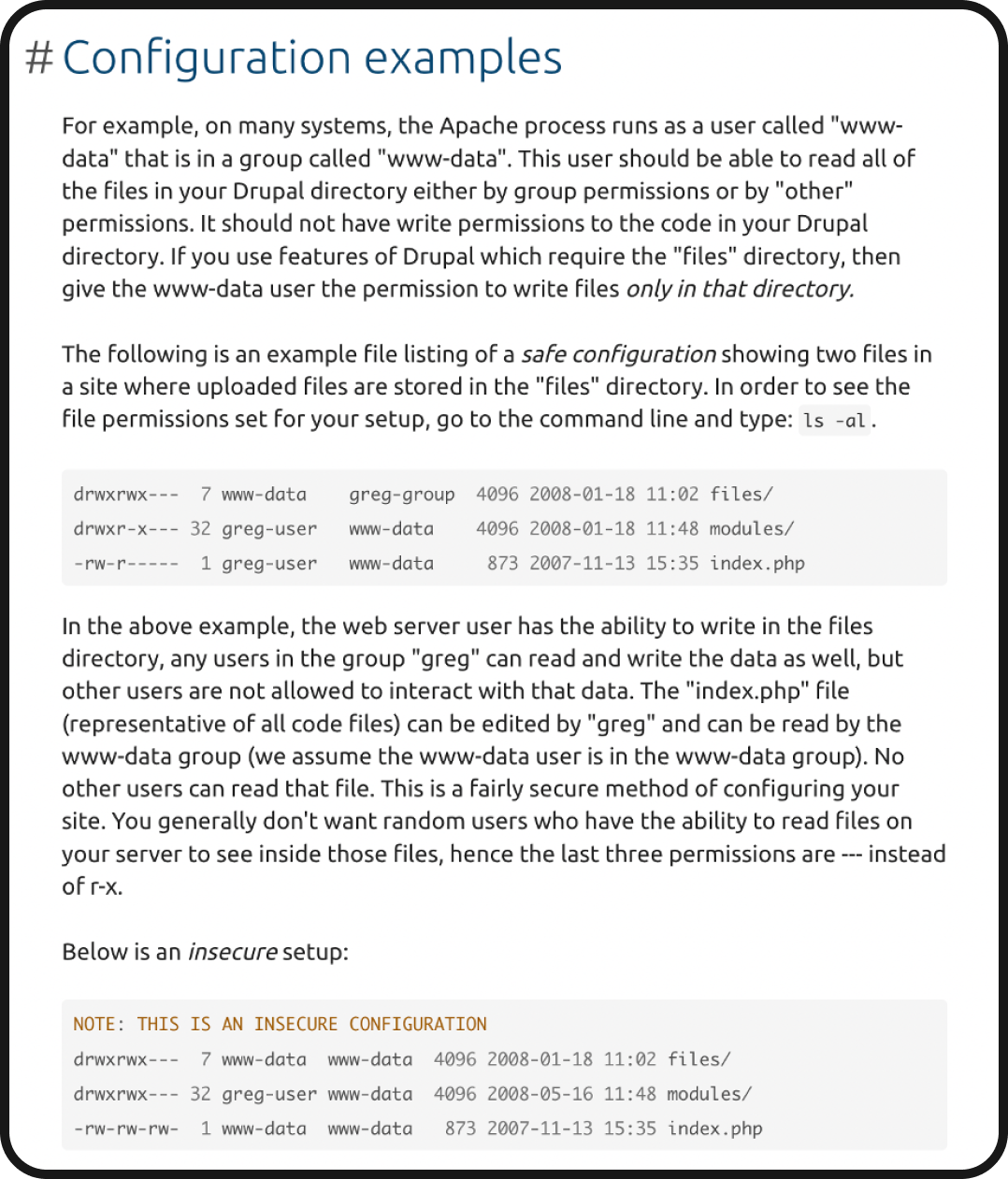
Screenshot of Drupal’s file permissions and ownership documentation showing example secure and insecure file permissions.
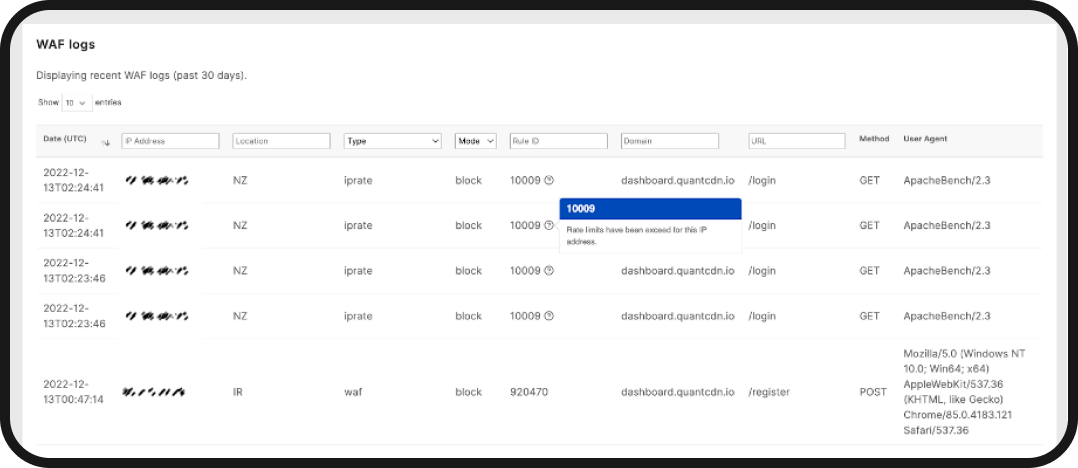
Screenshot of Quant WAF logs for example Drupal website.
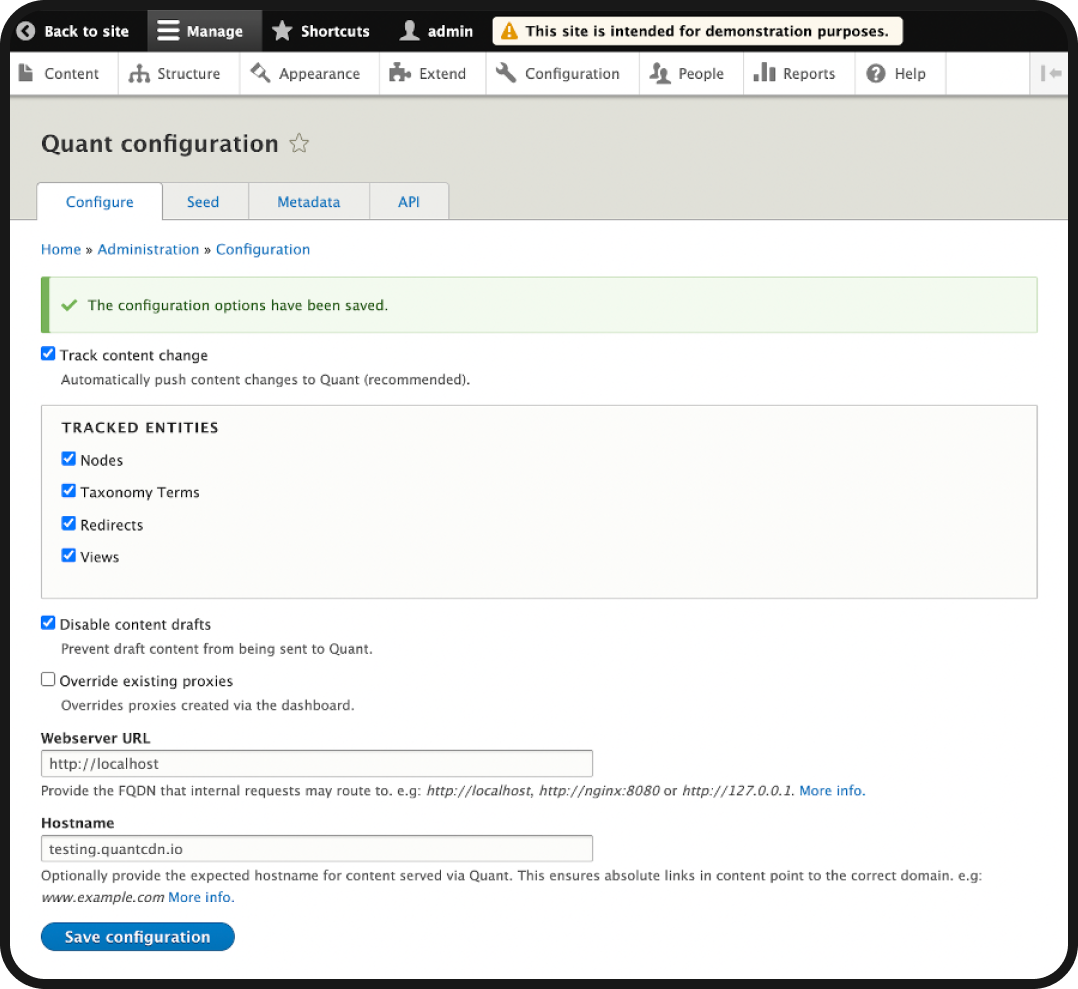
Screenshot of Quant module configuration settings for creating a static version of a Drupal site.
2: Regular updates and patching
What it is: Regularly updating your Drupal core, modules, and themes ensures that your website stays secure by fixing known vulnerabilities and security issues.
Positive impact: Applying updates promptly minimises the risk of attacks or breaches, and is the best solution to help protect your website and safeguard end-user data.
Steps to implement:
- Perform regular backups of your website in case they are needed for site recovery
- Monitor new Drupal releases before downloading and applying API updates available on Drupal.org
- Monitor for security updates and announcements from the Drupal Security Team
- Monitor your site’s update status report for required updates
- Set up a local or staging environment for testing updates and patches
- Apply updates and patches to your local or staging environment
- Thoroughly test your local or staging website after applying updates and patches, including testing template files and theme components for any security-related changes
- Go through the release notes and test any specific items that might affect your site
- Once the updates have been approved, schedule the deployment with your team
- Have content editors and unneeded admins stay out of the website during deployment
- Make sure you have the right technical support available during and after your deployment
- For some Drupal versions, you should manually put the site into maintenance mode
- Back up your website right before deploying changes to production
- Deploy the updates to your production environment
- Test any important pages and features on your production site, including both frontend and backend functionality
- For some Drupal versions, you should manually take the site out of maintenance mode
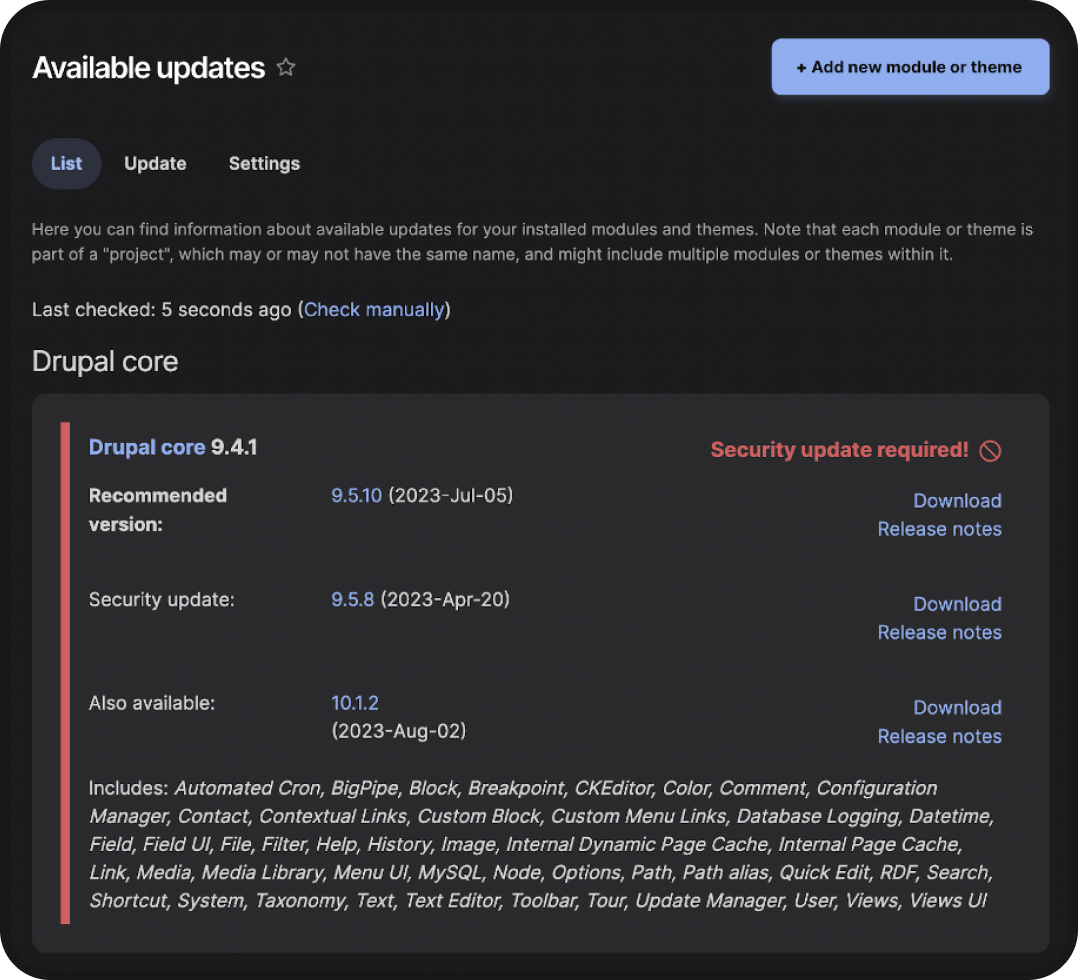
Screenshot of the Available updates report with status for Drupal core.
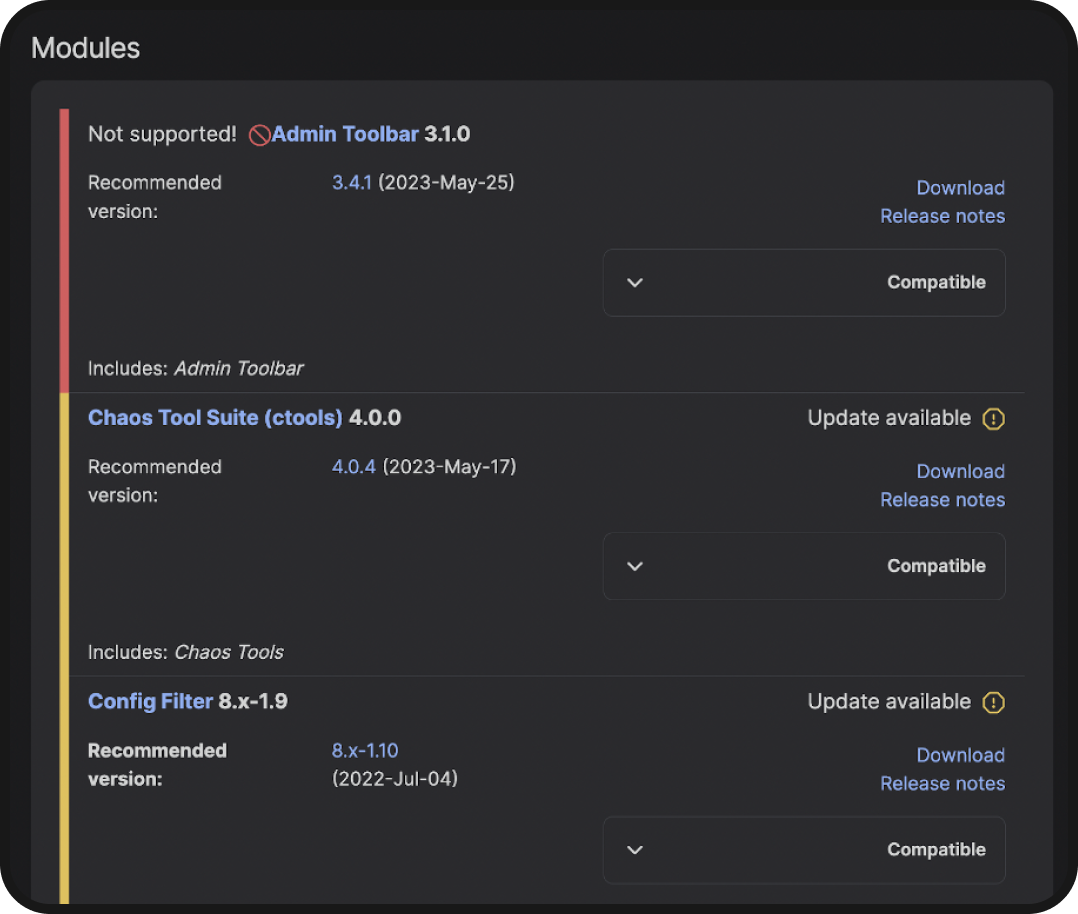
Screenshot of the Available updates report with status for modules.
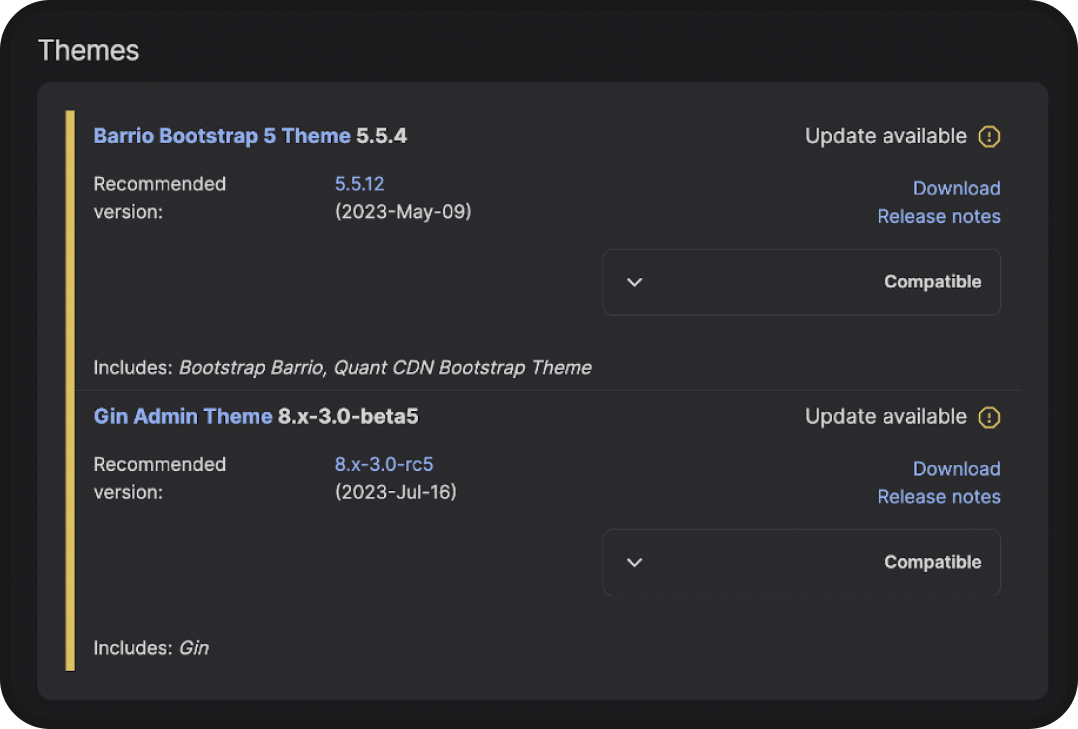
Screenshot of the Available updates report with status for themes.
3: Strong user authentication and access control
What it is: Implementing strong user authentication and access control mechanisms ensures that only authorised users have access to sensitive areas of your website.
Positive impact: Robust user authentication and access control reduce the risk of unauthorised access and protect your website’s resources and data.
Steps to implement:
- Define user roles and permissions for your website, particularly for content creation and administrative access
- Set up strong password policies and identity verification measures, including minimum length and complexity requirements
- Set limits on sessions (including for API access) so users are automatically logged out after a reasonable period
- Educate your admin users on safe password usage and handling
- Enable two-factor authentication (2FA) for enhanced account security; consider implementing LDAP authentication for enterprise environments to centralise user management and enhance security
- Enable login-related security modules such as Login Security and Password Policy to protect against automated bots
- Enable spam-related security modules such as Captcha and configure CAPTCHA settings to protect forms
- Limit the number of users with administrative privileges and implement measures to block repeated unauthorized access attempts to prevent brute force attacks.
- Regularly review and update user access rights
- Remove or block users, especially administrators, who no longer need access to the site
- Downgrade roles for users who no longer need admin access or promotion privileges to edit anything on the site, including marketing content.
- Review your site logs for suspicious 403 (access denied) logging
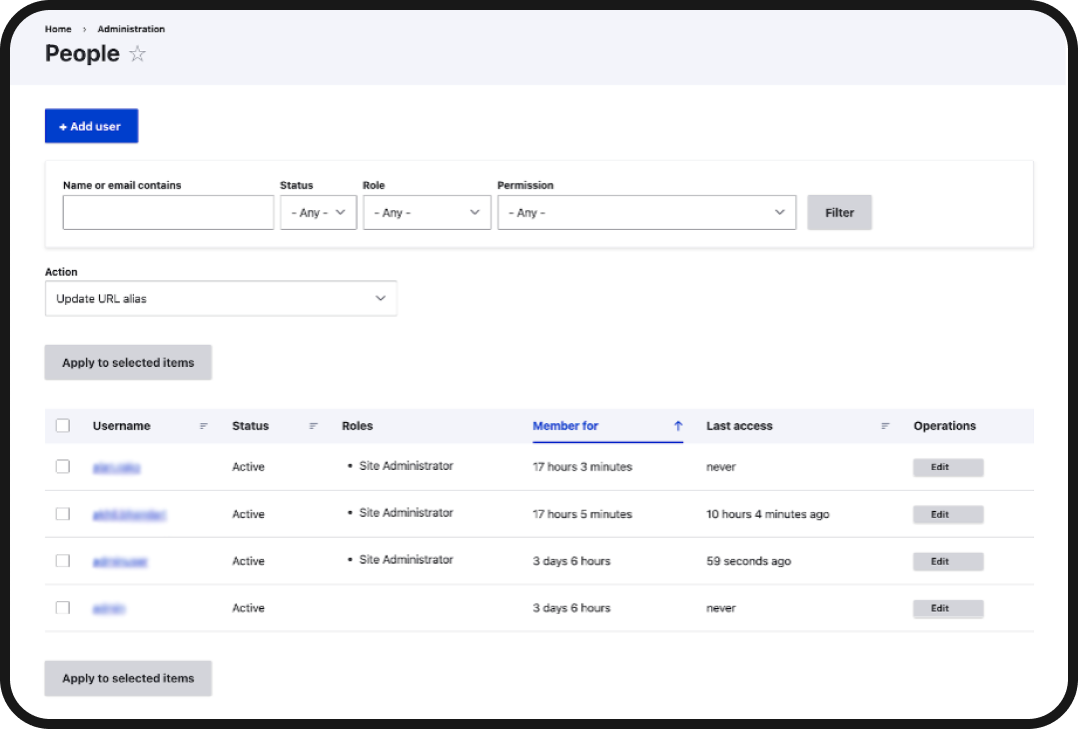
Screenshot of Drupal’s user list with their roles, status and access information.
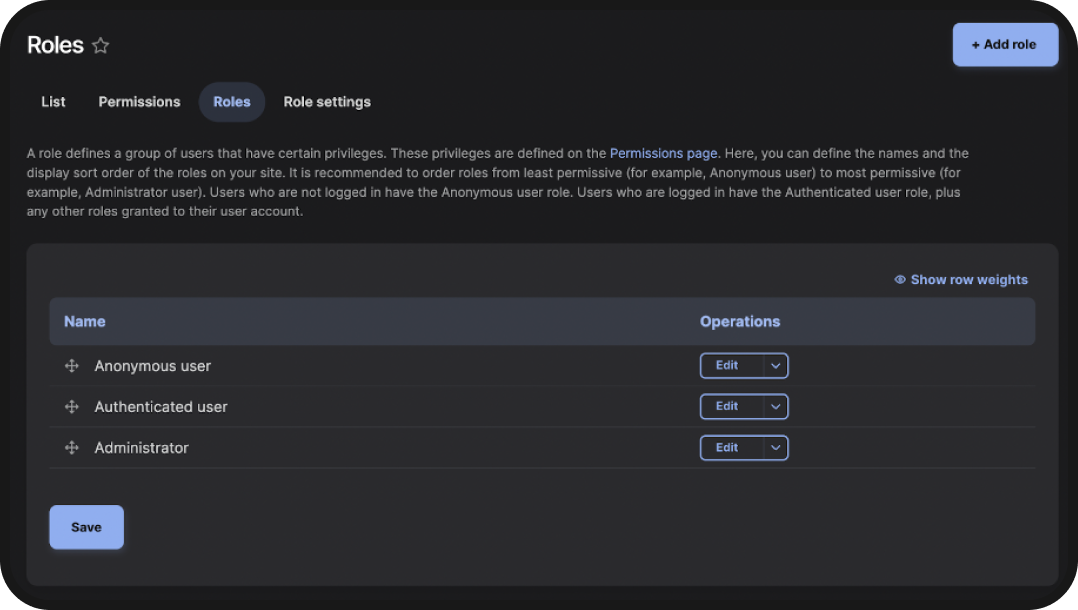
Screenshot of Drupal’s roles page.
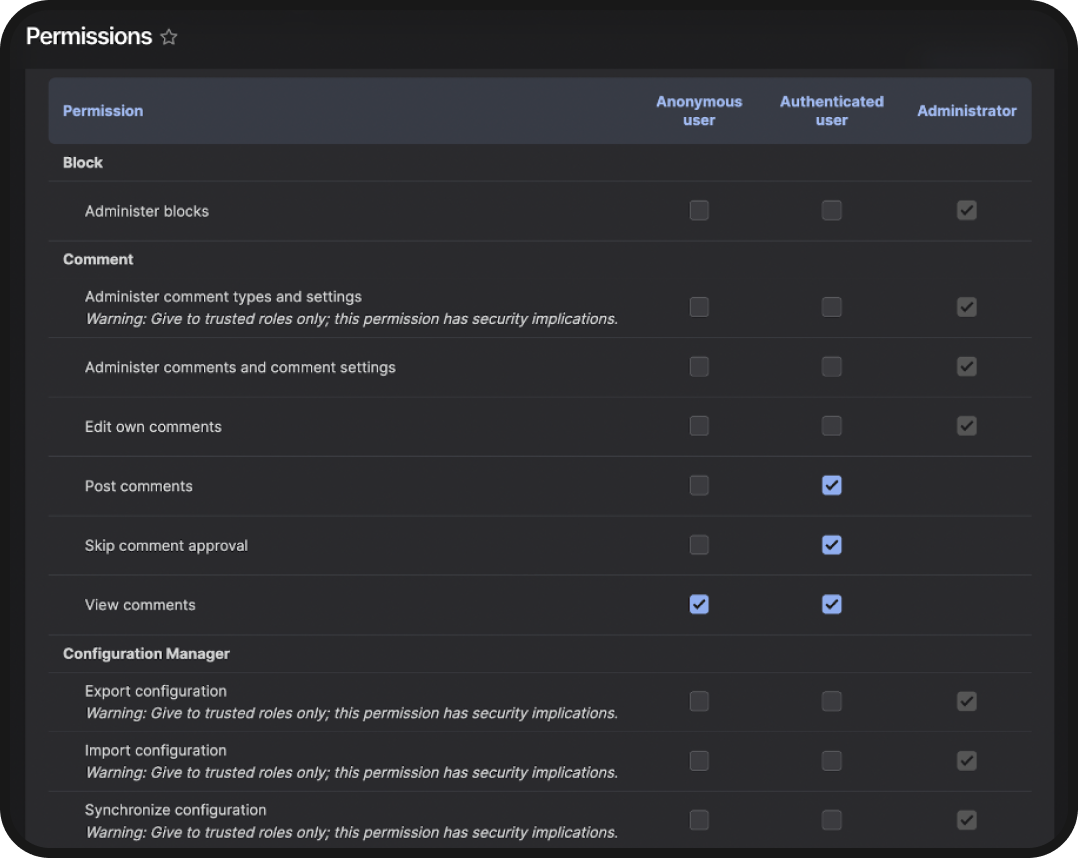
Screenshot of Drupal’s permissions page.
4: Input validation and data sanitisation
What it is: Input validation and data sanitisation involves the website verifying and cleaning user input before processing it to protect against security threats like cross-site scripting (XSS), SQL injection, and remote code execution.
Positive impact: Implementing input validation and data sanitisation is a great solution against attacks, and ensures that your website can handle potentially malicious input without exposing vulnerabilities or compromising UX
Steps to implement:
For custom Drupal modules, APIs, Web services, themes, digital marketing platforms, and site configuration. Secure coding practices during development are essential for maintaining security.
-
Use Drupal’s built-in input sanitisation functions and template filters to filter malicious content, such as Xss::filter() and Html::escape()
-
Use Drupal’s built-in database abstraction layer to properly sanitize database objects and RESTful endpoints to prevent SQL injection
-
Validate user input, including submitted URLs, click events, file uploads, API endpoints and form submissions, for proper length, type and format. Implement safeguards against malicious code that users might paste into form fields.
-
Understand and follow all Drupal security best practices for custom code
-
Minimise the number of forms and fields, including marketing and contact forms, to what is strictly required
-
Audit forms and fields regularly and disable or remove what is no longer necessary
-
Sanitise user-generated content using Drupal’s text formats
-
Audit your text formats regularly to remove unnecessary settings
-
Avoid modules and tools that allow JavaScript injection into the site
General considerations:
-
Test your website’s user interface for potential security vulnerabilities using tools like OWASP ZAP and WebDriver automated testing. These automated test drivers help ensure comprehensive security coverage.
-
Think like a hacker and have developers & cybersecurity personnel test for security vulnerabilities by sending multiple hits across different browsers (from modern ones like Safari to legacy ones like Internet Explorer), including tests with NoScript and other security extensions enabled. Test on both desktop and mobile, using malicious inputs like SQL, CSS, JavaScript and automated bots to attempt to break your forms.
-
Be careful when using third-party form services and Google Tag Manager tags
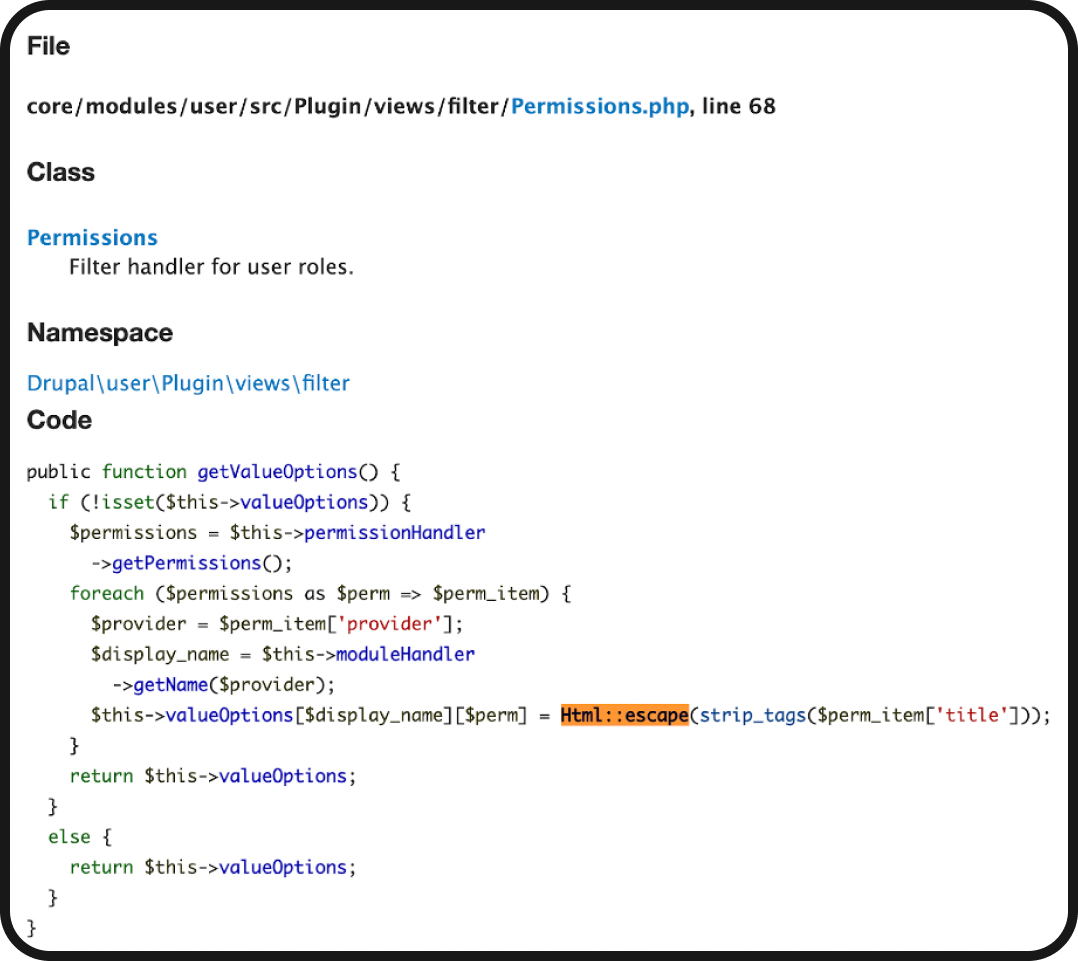
Screenshot showing the use of Html::escape in code.
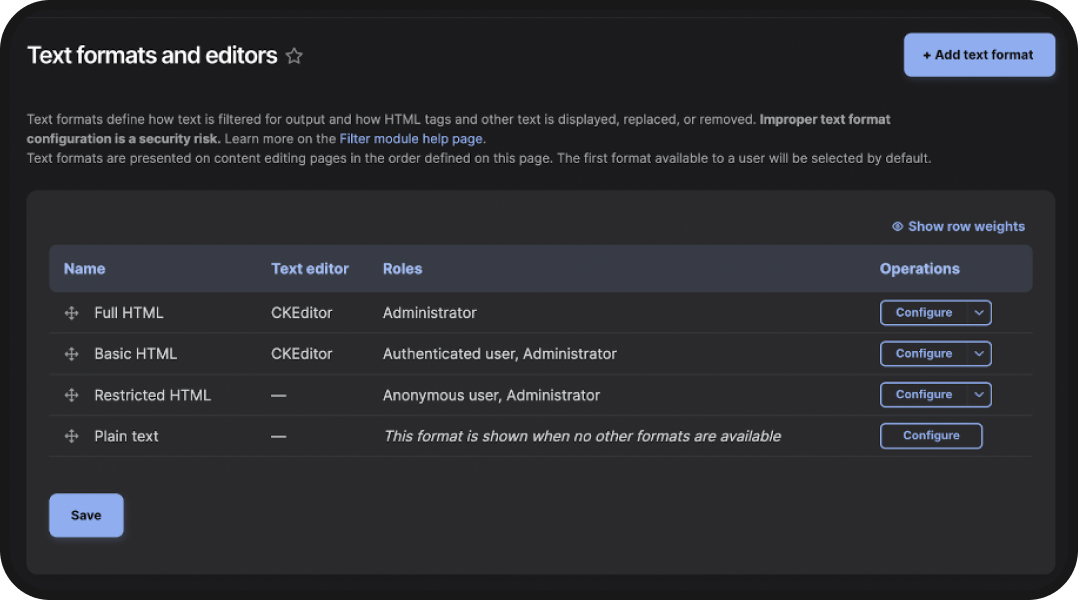
Screenshot of Drupal’s text formats.
5: Using HTTPS, SSL/TLS certificates and secure headers

What it is: HTTPS and SSL/TLS certificates ensure secure communication between your website and its users, protecting sensitive data during transmission.
Positive impact: Implementing HTTPS and SSL/TLS certificates is a simple solution that helps safeguard your website against eavesdropping and person-in-the-middle attacks, boosting user trust.
Steps to implement:
Either use a managed Drupal hosting service that handles certificates automatically or for self-hosted environments:
- Obtain an SSL/TLS certificate from a trusted certificate authority (CA)
- Install and configure the SSL/TLS certificate on your web server
- Check your SSL/TLS certificate and expiry with a tool like SSL Labs
- Update your Drupal configuration to enforce HTTPS
- Redirect all HTTP requests to HTTPS using .htaccess rules or server configuration
- Verify that all external resources (e.g. scripts, images) are loaded over HTTPS
- Update your SSL/TLS certificate regularly before it expires
- Run your site through securityheaders.com and fix any issues
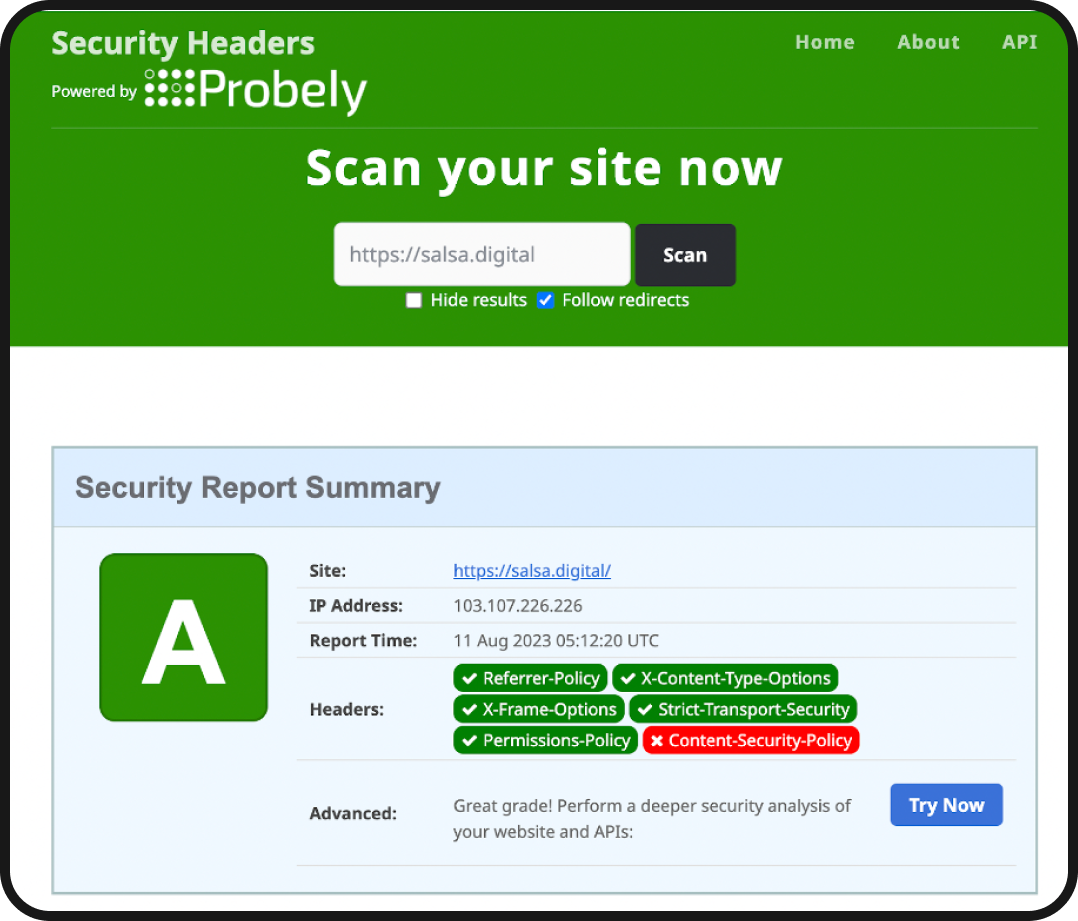
Screenshot of a Security Headers report for the salsa.digital website.
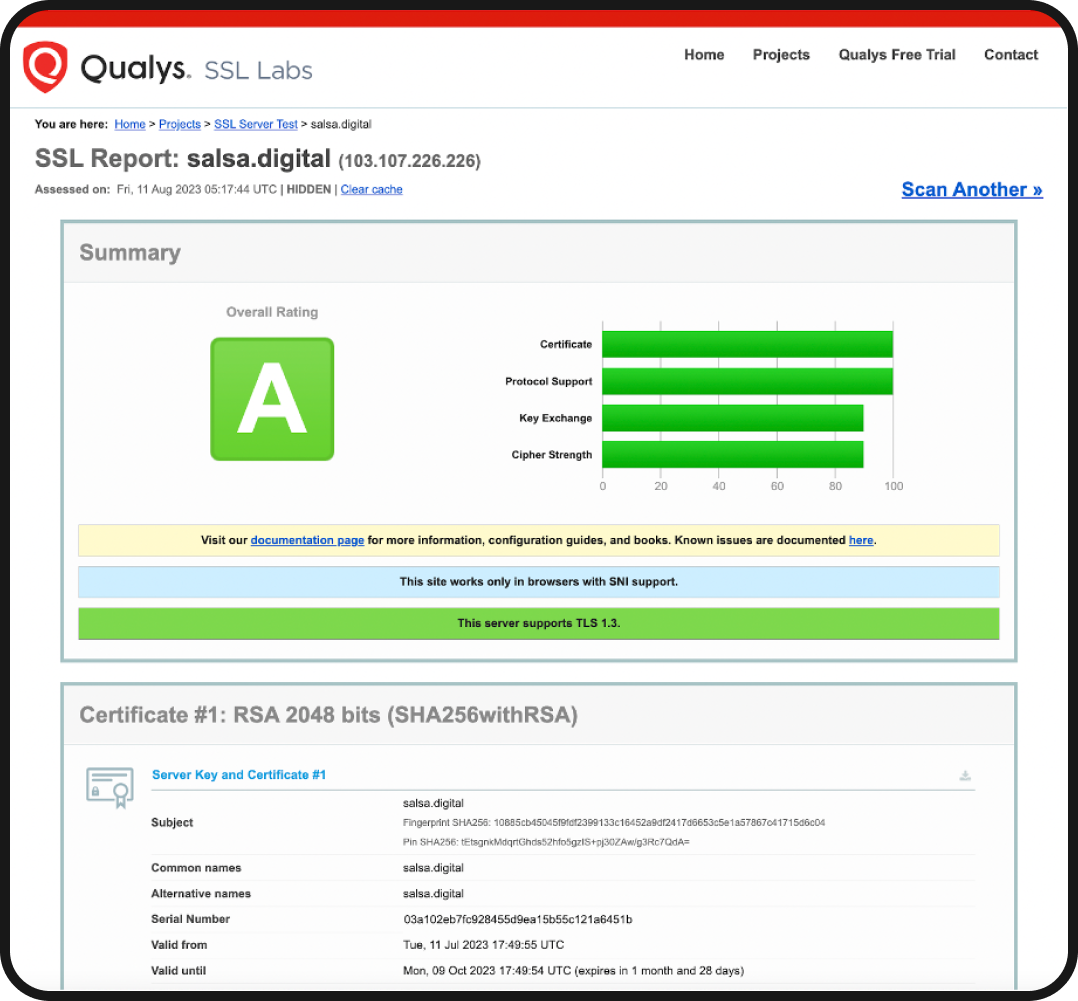
Screenshot of the SSL Labs report that includes the certificate’s expiration date.
6: Monitoring and logging
What it is: Monitoring and logging involve tracking your website’s activities to detect suspicious behaviour, security incidents, and RESTful API/web services performance issues.
Positive impact: Regular monitoring and logging help you proactively identify and find solutions to potential security threats before they escalate.
Steps to implement:
- Check with your hosting provider for what logging and monitoring tools are available
- Install Google Analytics or a similar web analytics service
- Use Google Search Console, marketing analytics tools, the Link checker module or similar tools to assess 404s (page not found) issues
- Enable Drupal’s built-in logging and error reporting features to monitor all endpoints.
- Use log analysis tools such as New Relic to analyse logs for suspicious activity
- Set up site a site monitoring service such as Pingdom or UptimeRobot
- Monitor performance metrics, system responsiveness, server hits, and resources to detect potential attacks or breaches
- Set up automated alerts and notifications for critical security events
- Review logs and security reports regularly, using tools to filter and identify patterns and trends, Ensure security logs are properly stored and encrypted to maintain their integrity for future audits.
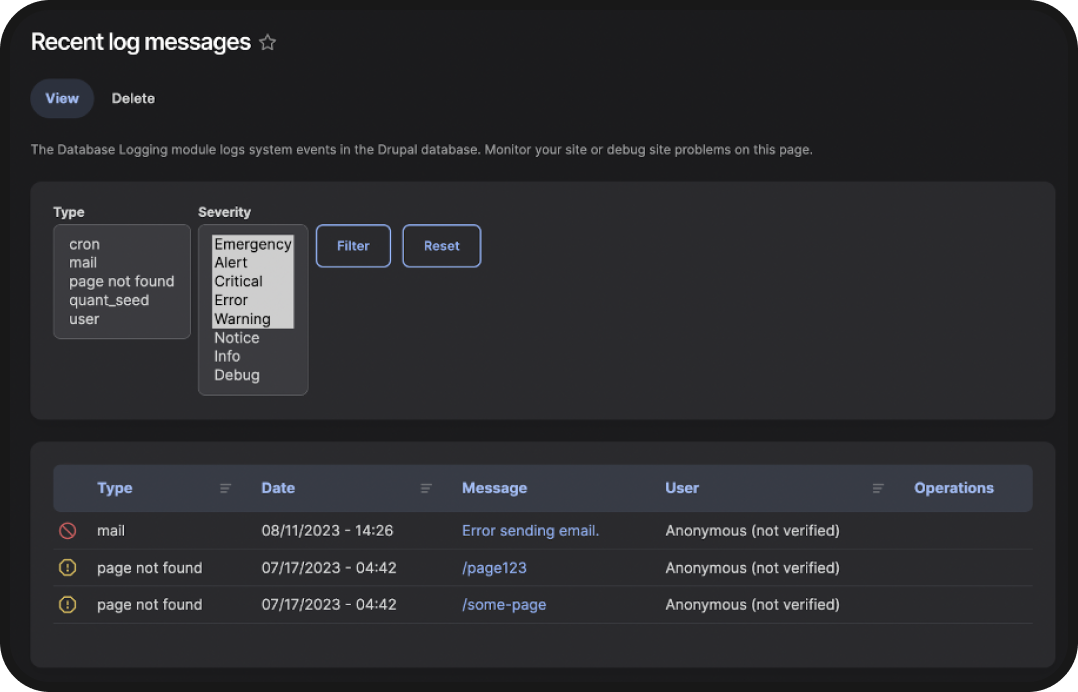
Screenshot of Drupal’s recent log messages.
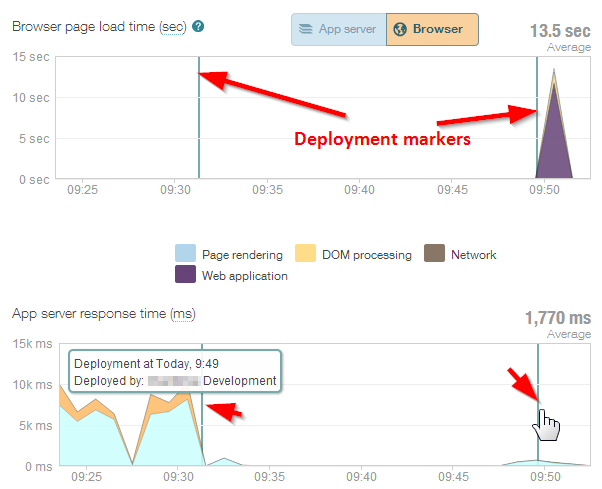
Screenshot of example Drupal New Relic performance from New Relic module page.
7: Security-focused modules and module risk assessment
What it is: Drupal’s security-focused modules enhance your website’s security by providing additional features and protections while maintaining good UX. These modules offer a comprehensive solution for managing user comments to prevent spam and unauthorized access, and may even include AI powered threat detection. In addition, all Drupal-contributed modules, including those affecting comments, have security implications that should be assessed. When selecting security modules, prioritize those that offer protection against critical threats that specifically target Drupal websites, especially for RESTful service endpoints. Consider modules that protect against harmful content users might copy and paste, such as remote code execution, which are particularly common in comment fields or rich text editors.
Positive impact: Using access control, spam, and security-related modules help strengthen your website’s security posture, reducing the risk of vulnerabilities and breaches and improving performance. These modules can effectively block spam attempts and unauthorized access. Regular audits and analysis of all installed modules for potential issues help you make informed decisions about what modules to keep or remove for increased security.
Steps to implement:
- Research and install reputable access control, spam, API security and other security-related modules such as:
- Antibot (rank #121) [Drupal 7, 8, 9, 10]
- Automated Logout (rank #167) [Drupal 7, 9, 10]
- Captcha (rank #12) [Drupal 7, 8, 9, 10] [Essential CAPTCHA functionality for form protection]
- Flood control (rank #191) [Drupal 7, 9, 10]
- Hacked! (rank #512) [Drupal 7, 8, 9] [only install on dev environment for analysis]
- Honeypot (rank #36) [Drupal 7, 9, 10]
- Login Security (rank #247) [Drupal 7, 8, 9, 10]
- Password Policy (#123) [Drupal 7, 8, 9, 10]
- Protected Pages (#385) [Drupal 7, 8, 9, 10]
- Security Kit (rank #95) [Drupal 7, 9, 10]
- Secure Login (rank #631) [Drupal 7, 8, 9, 10]
- Security Review (rank #275) [Drupal 7, 8, 9, 10]
- Session Limit (rank #450) [Drupal 7, 8, 9, 10]
- SpamSpan filter (rank #394) [Drupal 7, 8, 9, 10]
- Two-Factor Authentication (TFA) (rank #597) [Drupal 7, 8, 9, 10]
- Username Enumeration Prevention (rank #344) [Drupal 7, 8, 9, 10]
- Audit all installed modules and:
- Ensure they have opted-in to Drupal’s security coverage
- Remove contributed modules that do not have security coverage
- Remove contributed modules that can be replaced by core functionality
- Remove or consider disabling unused contributed modules to reduce your site’s attack surface and overall risk, especially during development and testing.
- Check modules are actively maintained
- Consider removing poorly maintained modules
- Review features of modules and any custom code snippet implementations to assess potential security risks
- Remove or heavily restrict modules that may pose high security risks such as allowing JavaScript injection
- Regularly update modules and check configuration
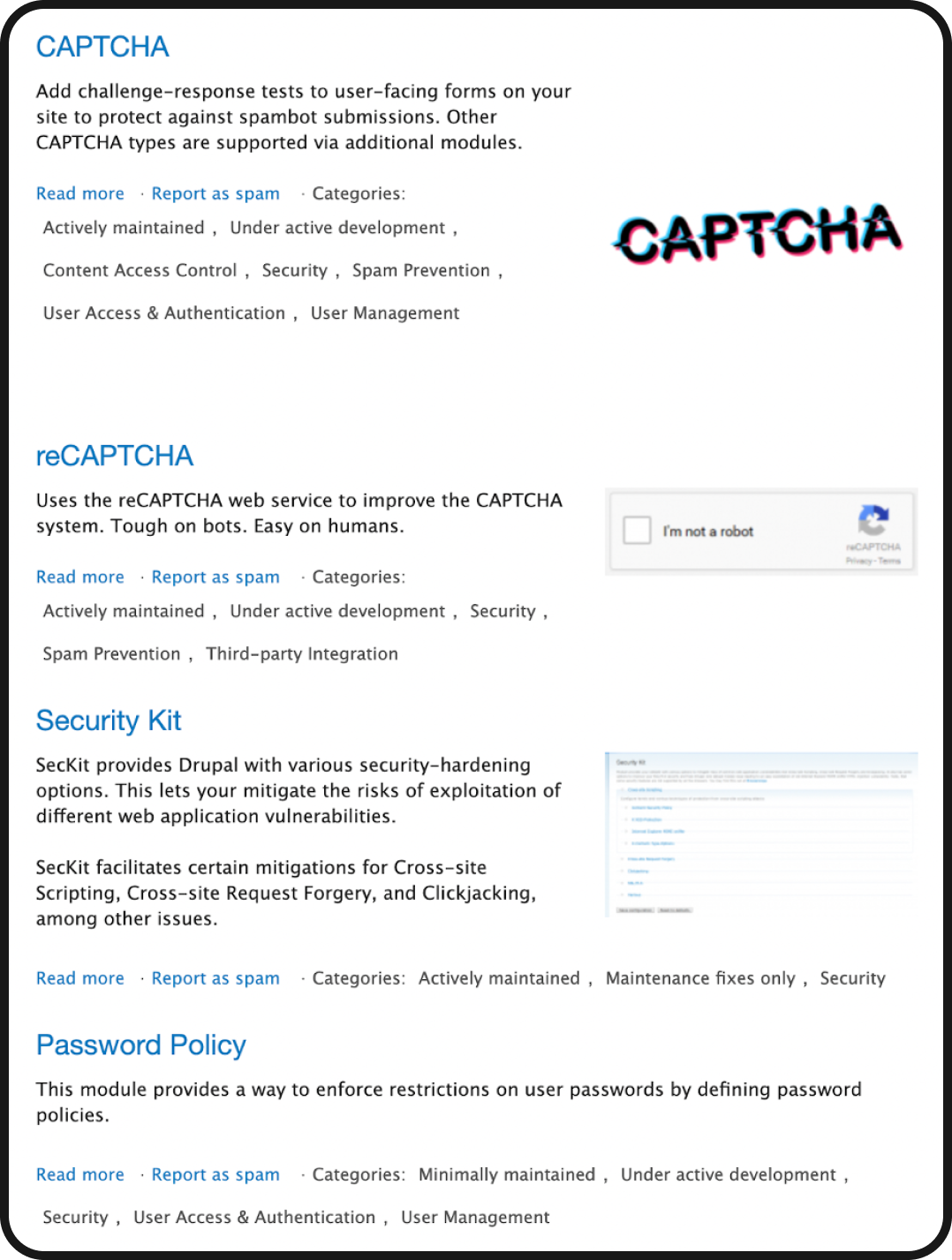
Screenshot of the top 4 Drupal 10 security modules on Drupal.org.
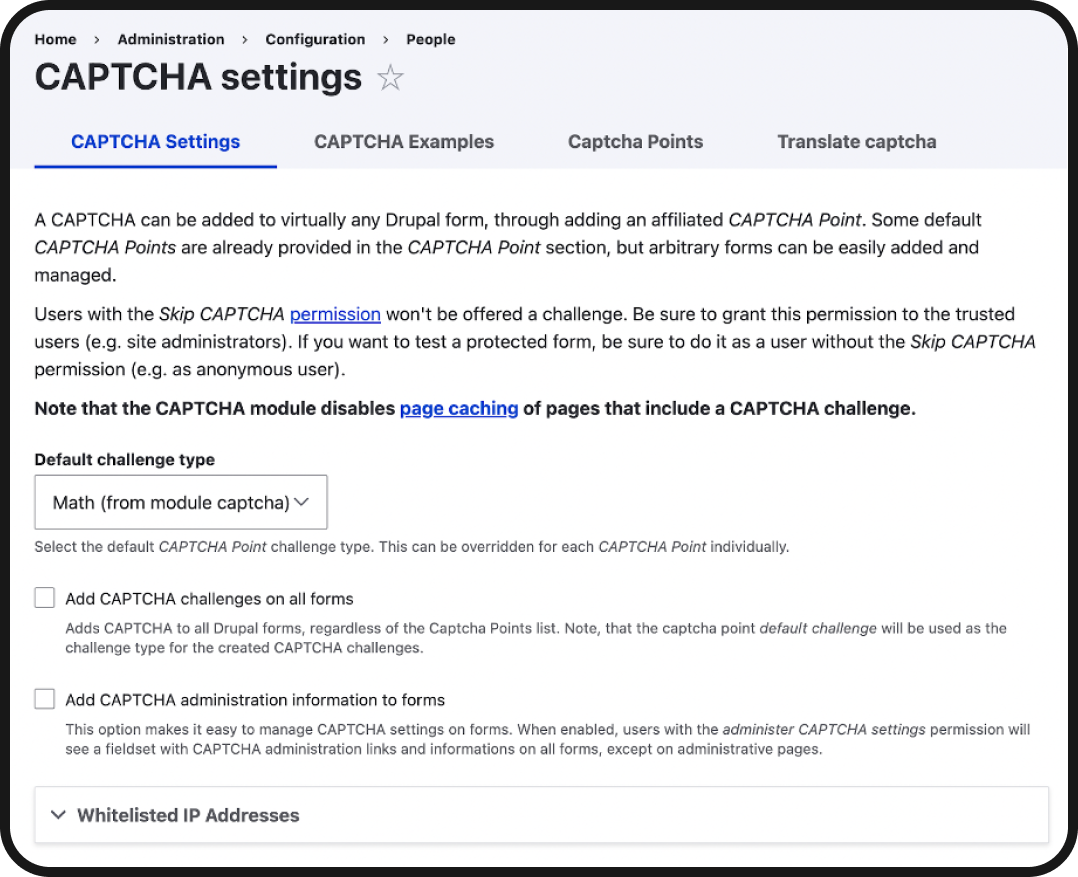
Screenshot of Drupal’s CAPTCHA module settings.
8: Regular security audits and penetration testing
What it is: Security audits and penetration testing involve assessing your website’s security posture to identify and address vulnerabilities and weaknesses.
Positive impact: Conducting regular security audits and penetration testing helps you proactively address potential threats and improve your website’s overall security.
Steps to implement:
- Establish a schedule for your developers to carry out regular security audits and penetration tests
- Use reputable tools, such as OWASP ZAP or Burp Suite, to conduct vulnerability scans and penetration tests of your web services (including for AP endpoints). Configure WebDriver to automate security testing alongside its usual functional testing role. Focus particularly on vulnerabilities that could enable remote code execution, as these pose significant risks to your Drupal site.
- Perform manual testing across both desktop and mobile interfaces, including file upload functionality, to identify potential weaknesses not detected by automated tools.
- Remediate identified vulnerabilities and verify fixes through retesting
- Document the results of security audits and penetration tests to track progress and improvements, and include detailed assessments of integrated marketing platforms in your security documentation.
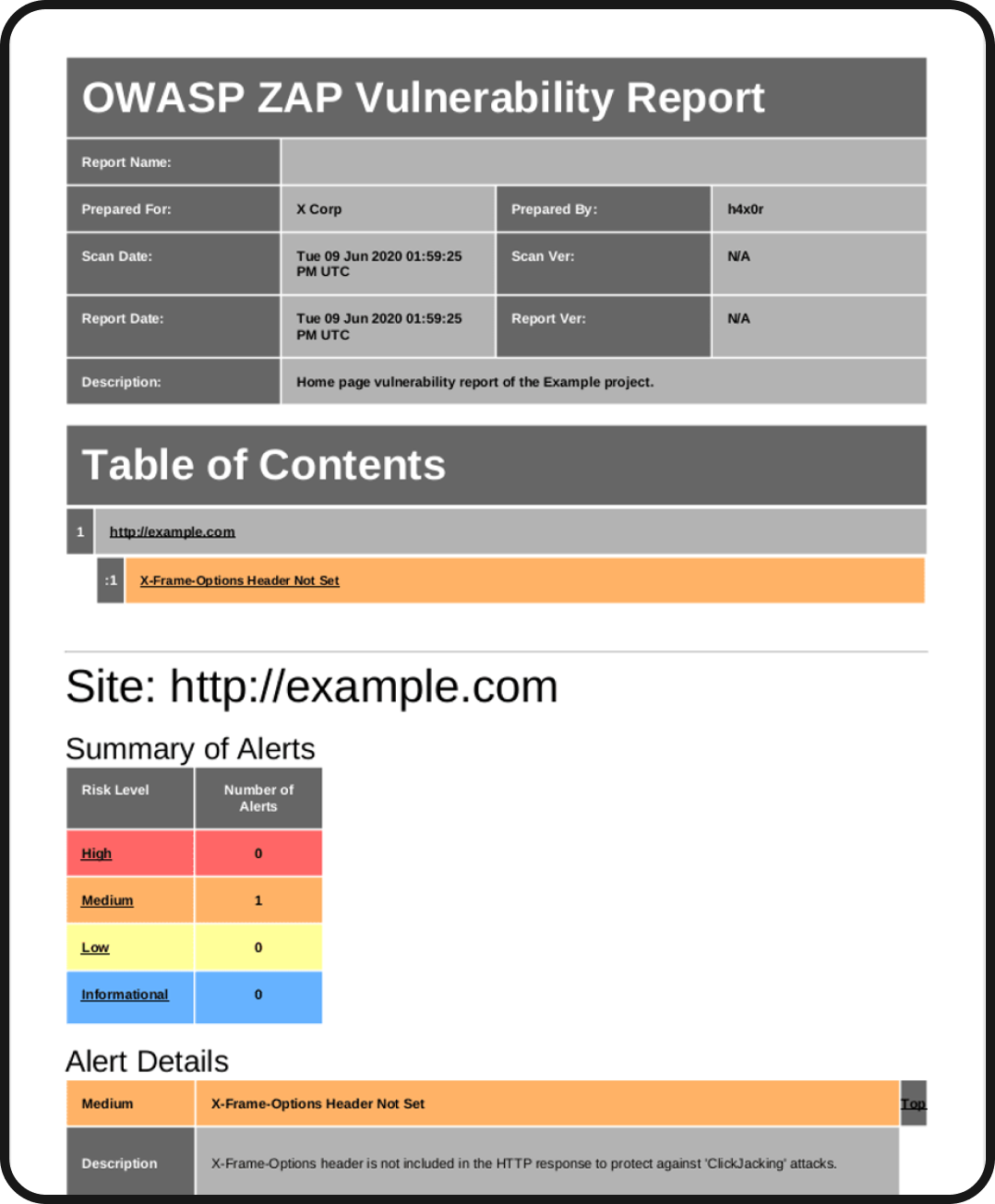
Screenshot of example OWASP ZAP Vulnerability Report from Senik Hakobyan.
9: Secure backups and disaster recovery plan
What it is: Secure backups and a disaster recovery plan involve creating and maintaining regular copies of your website data and having a well-defined process to restore your site in case of a security breach or data loss.
Positive impact: Implementing secure backups and a disaster recovery plan ensures business continuity, consistent performance and minimises downtime in the event of a security incident or data loss.
Steps to implement:
- Check with your hosting provider to understand your backup options
- Set up and keep maintaining a schedule for regular backups of your website’s files and databases, API data, and email archives
- Ensure all backups are securely stored in an off-site location to protect against data loss
- Use strong encryption on backup data to prevent unauthorised access
- Test the recovery process by periodically installing a copy of your website from a backup
- Document your recovery plan, including email recovery procedures, and make it accessible to all relevant stakeholders, including current and future developers.
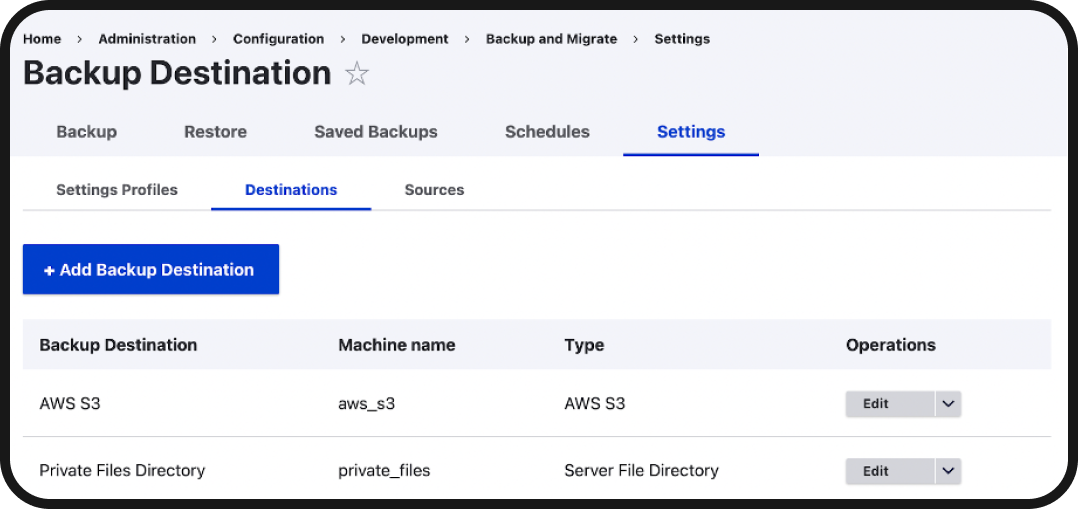
Screenshot of the Drupal Backup and Migrate module’s destination settings.
10: Employee training and awareness
What it is: Employee training and awareness involves educating your team members, especially developers, on security best practices, potential threats and their responsibilities in maintaining your website’s security. This includes emphasizing the importance of secure email communications. Educating employees on how to recognize and handle malicious email threats, such as phishing attacks, is critical for safeguarding your website’s security.
Positive impact: By fostering a security-aware culture, your team can identify and address potential security issues more effectively, reducing the risk of security breaches.
Steps to implement:
- Develop a comprehensive security training program for your employees that is tailored to the PHP environment Drupal operates in, and covers essential steps like API security, and includes training on how to export and interpret security data.
- Cover topics such as secure coding practices, password security, phishing awareness, and procedures for exporting security reports.
- Provide regular training updates and refresher courses to keep employees informed of emerging threats and best practices
- Establish clear security policies and guidelines for your team to follow
- Encourage open communication and reporting of potential security issues
Part 4 — The importance of website security and best practices
In today’s digital landscape, securing your Drupal website should be a top priority. Ensuring and maintaining your site’s safety not only protects your business and its reputation but also preserves the trust and confidence of your users. By understanding the importance of website security and ensuring that your developers and every other team member follow best practices, including secure email protocols, you can minimise the risk of security breaches and keep maintaining a safe online environment for your users.
By prioritising website security and implementing the 10 contributing factors discussed in this guide, you can effectively safeguard your Drupal site. Remember, prevention is always better than cure, and investing in your website’s security today can save you from significant headaches and expenses down the line.
Part 5 — Our contribution to improving Drupal security for our clients and the community
In this section, we share our own experiences and case studies on how we’ve contributed to Drupal security for our clients and the Drupal community. We’ve divided this section into three subsections to provide an easy-to-follow structure and to highlight our expertise in each area:
- Implementing best practices for clients
- Sharing our knowledge with the community
- Drupal360.io: our free audit tool with emphasis on security
1. Implementing best practices for clients
In our work with clients, we’ve focused on implementing Drupal security best practices, as discussed in this guide. We work closely with government agencies, building highly secure platforms and websites. For example, Salsa and GovCMS worked together to get IRAP certification for the GovCMS program (read the GovCMS IRAP certification case study). We also secured authority to operate for another large portal (read the case study on a federal agency securing authority to operate). In addition, many Salsarians have baseline clearance so they can work on highly secure government projects. Our comprehensive approach includes the ability to export detailed security reports and exception logs, ensuring stakeholders have access to real-time data on their security posture, and is the reason our customers rarely have any security concerns or breaches.
By helping clients with updating their Drupal installations, ensuring secure backups, implementing secure logout procedures and other essential security best practices, we’ve helped businesses maintain a strong online presence while protecting their customers’ data. The export feature enhances transparency and enables informed decision-making by providing actionable insights into the security measures in place.
In addition to Drupal, we also support deployments across major cloud platforms including AWS
2. Sharing our knowledge with the community
We believe in giving back to the Drupal community by sharing our knowledge and expertise on security best practices. We regularly participate in Drupal events, contribute to forums, and write blog posts on various security topics, which demonstrates our commitment to open source values. Some of our blogs on security are:
- Drupal defense in depth — a Drupal security protection framework
- Australian Protective Security Framework
- Cloud security in Victorian government
- [Web applications security #1](Web applications security #1)
- Security at every level
- Australia’s ‘Essential Eight’ for cyber security
- DTA Secure Cloud Strategy — cyber security update
- Managing the security risk of running Drupal 7 after End-of-Life
We also have a dedicated Chief Information Security Officer (CISO) who focuses on security for Salsa, our platforms and our clients. Our team also includes UX and accessibility experts who ensure that implementing the best security practices does not compromise user experience.
Salsa is also an official supporting partner of Drupal Steward, a fully managed web application firewall service that significantly reduces the risk between the time security vulnerabilities are discovered and the time websites are patched. This additional website security is especially important for Salsa’s many government clients.
Our team members are active contributors, from security experts to coders, who regularly contribute to Drupal’s core development and security-related modules, helping to make the platform more secure for all users.
Salsa Support
View all our security services
1. Salsa Support
Salsa Enterprise Drupal Support can be used to draft a comprehensive plan covering security fixes, exception handling and improvements. Our experienced coders can then action these items from the backlog.
2. Security audits
Salsa’s Drupal security audits involve comprehensively evaluating your open source website’s security measures, including login and logout processes, digital marketing integrations, and identifying potential vulnerabilities.
3. Security patching
Salsa’s SLA-backed patching and maintenance services can be used to ensure security patches are applied immediately after they’re released to keep your site secure.
4. Salsa Hosting
Salsa’s Drupal enterprise hosting platform offers several security protections as standard for any open source deployment, including distributed denial-of-service (DDOS) protection, a Web Application Firewall (WAF), multi-factor authentication, secure logout handling, exception monitoring and intrusion detection and remediation.
5. General cybersecurity services
Salsa’s Drupal cybersecurity services offer several layers of protection for customers on Drupal. Related services include:
- Rehosting onto our secure hosting platform
- Locked-down controls at origin
- WAF with enterprise security controls, including secure logout management
- Intrusion detection, exception handling and remediation handled by our expert coders
View all our security services
Our comprehensive services for Drupal security, from audits and assessments to custom solutions and ongoing maintenance, ensure that your Drupal site remains safe, secure and compliant with industry standards. With our expert support, you can focus on growing your business while we handle your site’s security needs.